4 Methods to Check Your UAE Visa Status By Official IDs
You can check your UAE visa status by four major methods on the official government websites. We cover all four of them for you: Check your visa status by passport number, Emirates ID, file number, and UID number. Use the option that matches your situation and get your status in minutes.
Need more than just a quick check? Check the detailed guide on processing, renewals, cancellations, and bans.
Check UAE Visa Status
You will be redirected to the official UAE visa portal to verify your visa details.
Method 1: Check by Passport Number (The Most Common Way)
Most tourists and visa holders use this method. No file number needed. Just your passport.
The UAE built its system around your passport as your main ID. No special codes. No application numbers. Just the document you already carry.
What You'll Need
- Your passport number
- Your passport expiry date
- Your nationality
The One Thing That Trips People Up
Here’s where most people get stuck. The UAE has two different immigration systems. Use the wrong one, and you’ll hit that dreaded “No Record Found” message. Before checking your visa status, ensure your passport has enough validity. If it expires soon, renew your passport before traveling to avoid entry issues.
If your visa came from | Use this portal |
Dubai | |
Abu Dhabi | |
Sharjah | ICP Smart Services |
Ajman | ICP Smart Services |
Umm Al Quwain | ICP Smart Services |
Ras Al Khaimah | ICP Smart Services |
Fujairah | ICP Smart Services |
Important note
GDRFA is mainly used for Dubai-issued visas. On it, the visa status is usually checked by the file number, application number, transaction number or order number.
Passport number search is generally not available on the website. So download the GDRFA Dubai App.
Navigational path changes with the app updates.
Step-by-Step: What to Do Actually
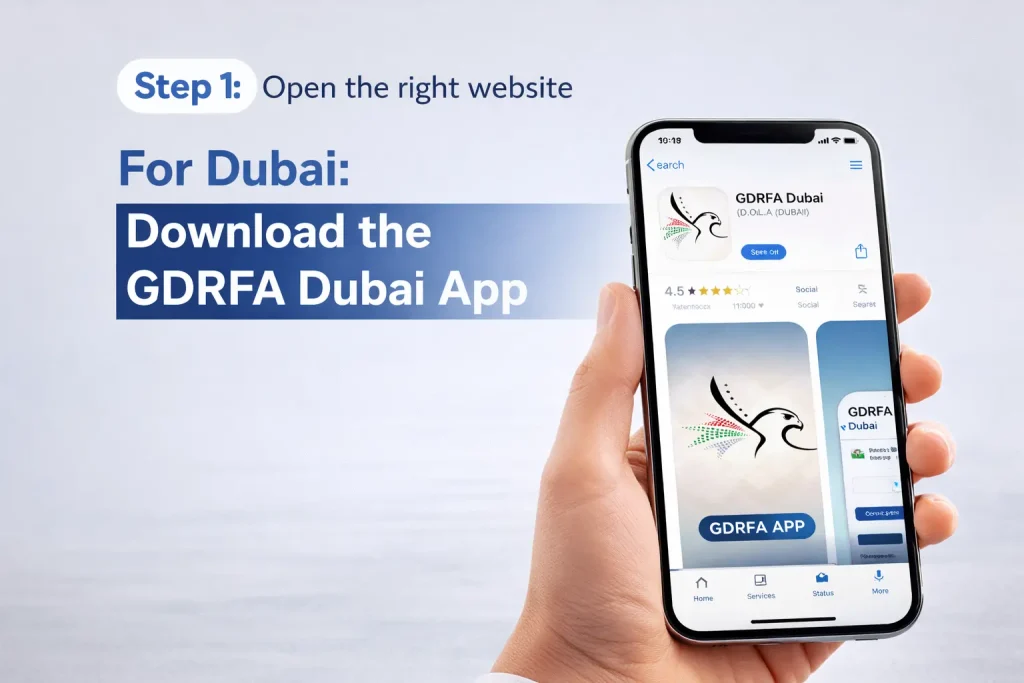
- Step 1: Open the right website
- For Dubai: Download the GDRFA Dubai App
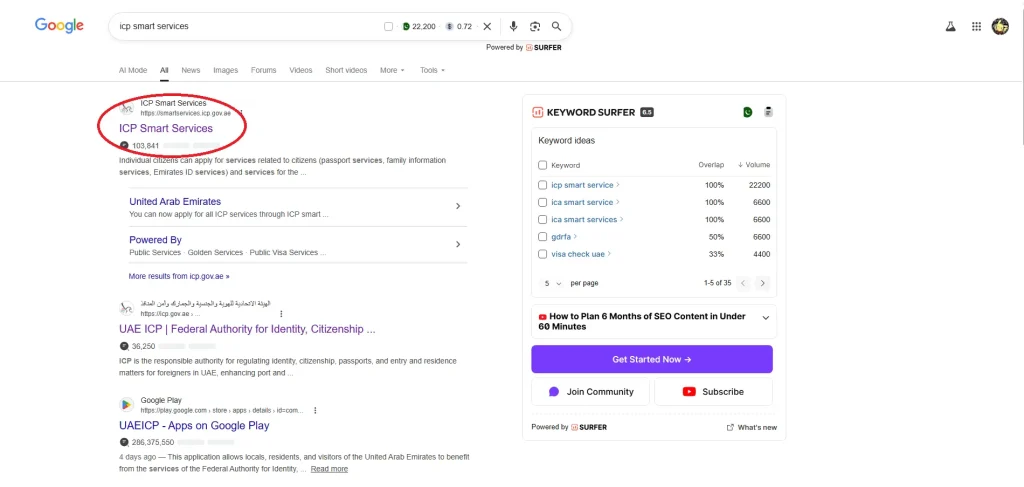
- For Abu Dhabi, Sharjha, Ajman: Go to ICP Smart Services
Both the website and app are mobile-friendly, so you can do this from your phone just as easily as from a computer.
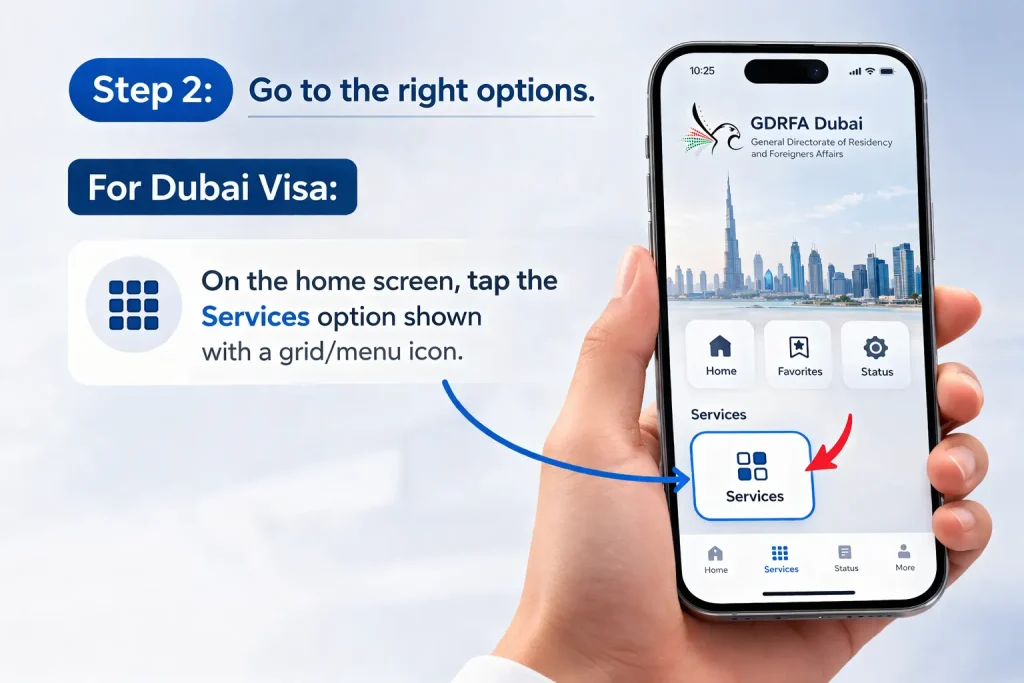
- Step 2: Go to the right options
- For Dubai Visa: On the home screen, tap the Services option shown with a grid/menu icon.
- For Abu Dhabi, Sharjah, and Ajman: On the ICP Smart Services site, go to the Public Service option in the top-left corner after the Home option.
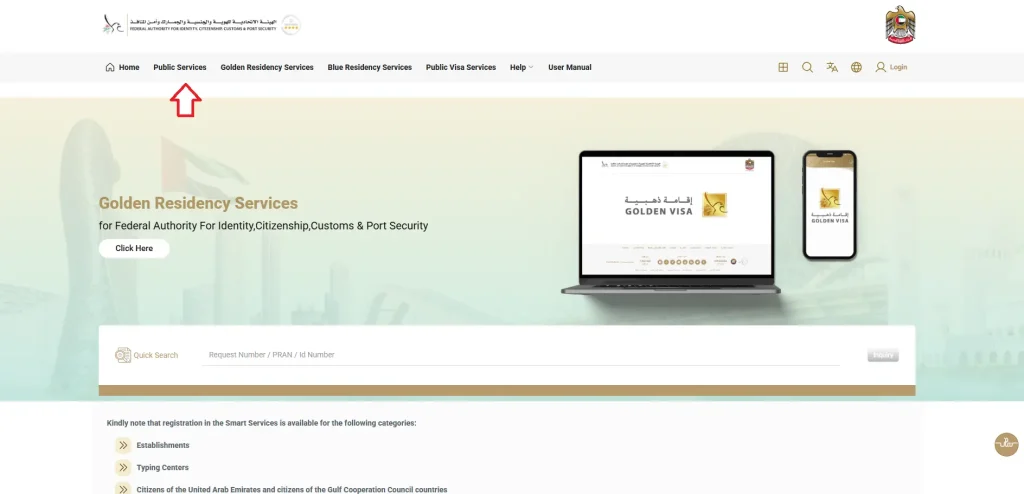
- Step 3: Further Navigation
- For a Dubai visa: After clicking the service option, scroll down to the Entry Permit Services section.
Inside that section, you will see File Status Inquiry. Tap File Status Inquiry. Then select passport information and your visa type.
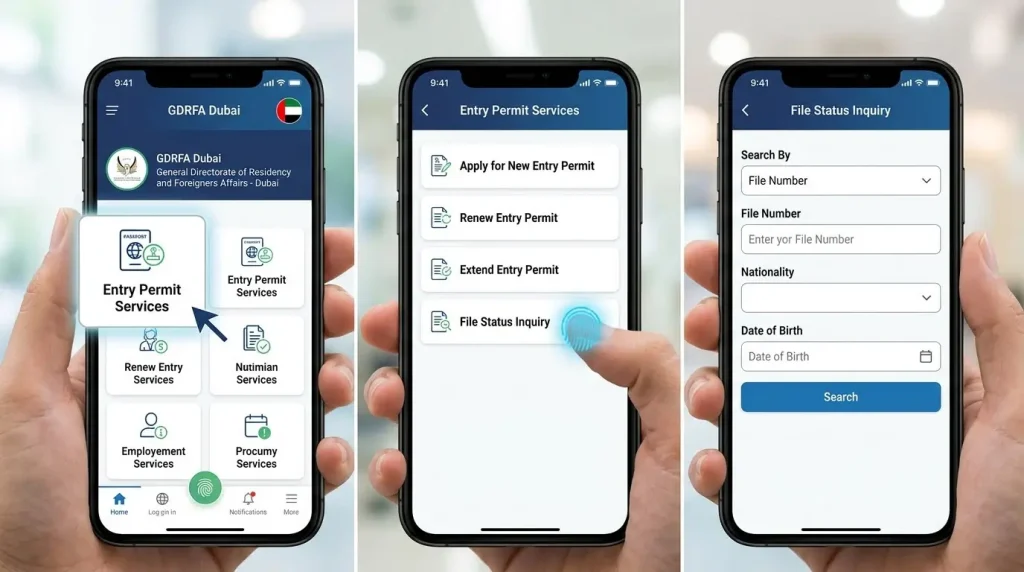
- For Abu Dhabi, Sharjah, and Ajman: After clicking the Public Service option, you will come to the page with the file validity option in the top-left corner after the Establishment Inquiry option.
Click it.
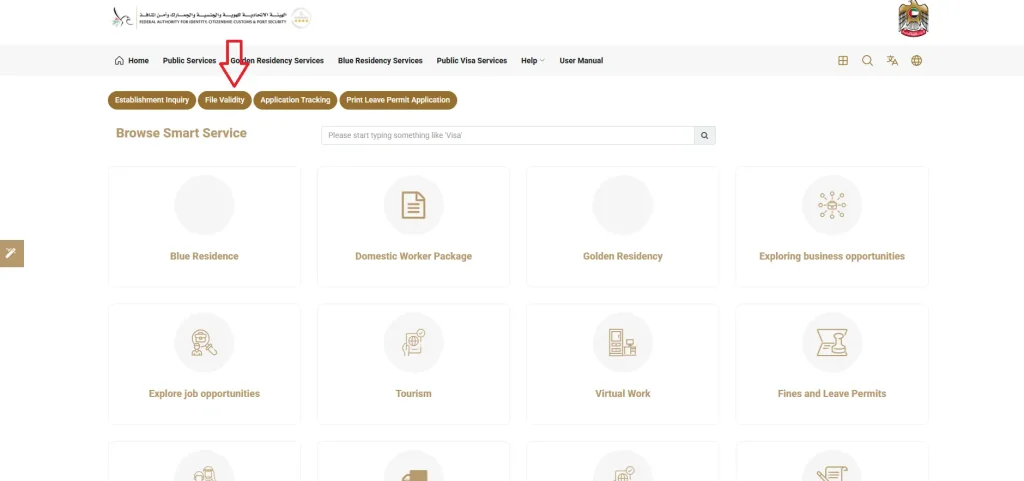
You will be directed to the page with the passport option in the GCC section of the file validity page.
- Step 4: Enter your details carefully
- Passport number: Type it exactly as written. No extra spaces, no dashes.
- Expiry date: Pay attention to the format the website wants (usually DD/MM/YYYY).
- Nationality: Pick your nationality.
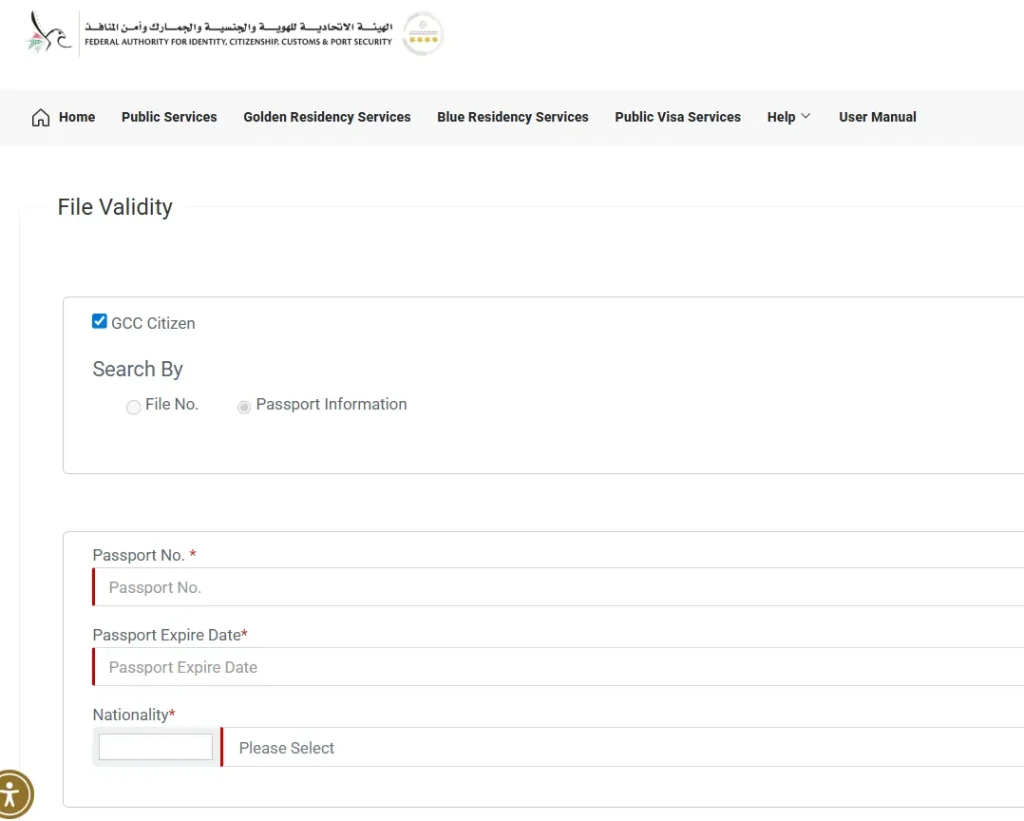
- Step 5: Clear the captcha and hit "search"

Within seconds, your status appears. You’ll see:
- Whether your visa is active, expired, or used.
- Your visa expiry date.
- Your file number (write this down; it’s useful for future checks).
A small but useful tip: Take a screenshot of the result. If you ever need to prove your status at the airport, to an employer, or to any official, that screenshot saves the day. It’s as valid as a paper document in most situations.
Method 2: Check by Emirates ID (For Residents)
If you’re living in the UAE, put down your passport for a moment. Grab your Emirates ID instead. It’s faster and shows you more information.
It’s your official ID card as a UAE resident. The government issues it through the Federal Authority for Identity and Citizenship. The card has your photo, personal details, and that 15-digit number on the back. You’ll need it for everything.
What You'll Need
- Your Emirates ID card and your date of birth
- The ICP smart services portal
How to Do It
- Step 1: Open the right website
- Go to ICP Smart Services.
- Step 2: Go to the right options
- On the ICP Smart Services site, go to the Public Service option in the top-left corner after the Home option.
- Step 3: Further Navigation
- After clicking the Public Service option, you will come to the page with the file validity option in the top-left corner after the Establishment Inquiry option.
- Click it.
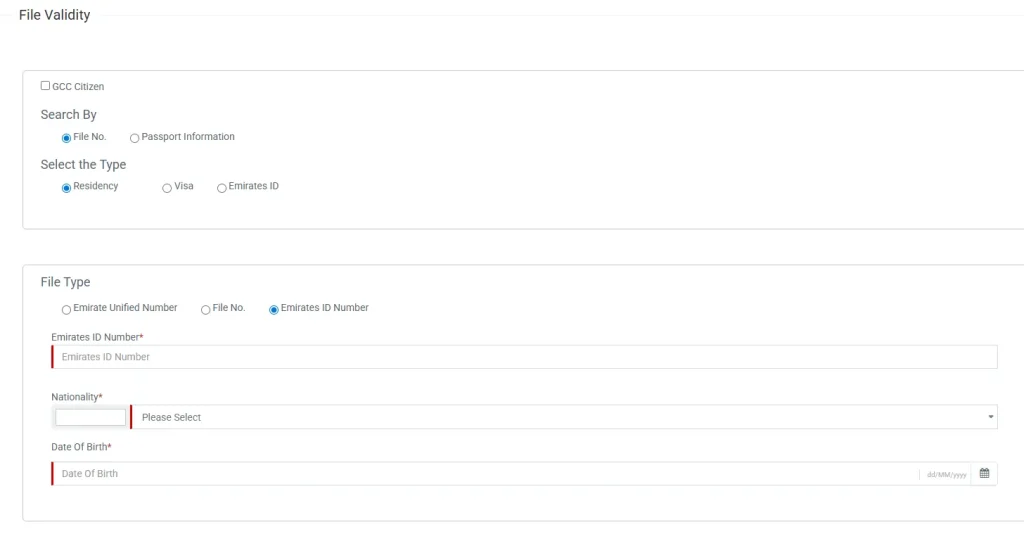
- You will be directed to the page with the file number option. Select it with the residency option underneath the file option in the GCC section of the file validity page.
- After choosing both the file number and the residency option, a section appears underneath with the option of Emirate ID. Select the option
- Step 4: Enter your details carefully
- Emirate ID number: Type it exactly as written. No extra spaces, no dashes.
- Date of Birth: Pay attention to the format the website wants.
- Nationality: Pick your nationality.
- Step 5: Clear the captcha and hit "search"
Within seconds, your status appears. You’ll see:
- Whether your visa is active, expired, or used.
- Your visa expiry date.
- Your file number (write this down; it’s useful for future checks).
Method 3: Check Your Visa Status By UID Number
Your UID (Unified Number) is a permanent 9-digit identification number that the UAE assigns to you the first time you enter the country or apply for any visa.
Where to Find Your UID
Document | Where to look |
Emirates ID | Back of the card, near the top |
Visa sticker (in passport) | Top of the visa, often labeled “UID.” |
E-visa (PDF) | Top-right corner, usually 9 digits |
Old visa copies | Any previous visa document |
If you can’t find it anywhere, don’t worry. You can also get it by checking with your passport first; the UID will show up in the results.
Step-by-Step: What to Actually Do
- Step 1: Open the right website
- Go to ICP Smart Services.
- Step 2: Go to the right options
- On the ICP Smart Services site, go to the Public service option in the top-left corner after the Home option.
- Step 3: Further Navigation
- After clicking the Public Service option, you will come to the page with the file validity option in the top-left corner after the Establishment Inquiry option.
- Click it.
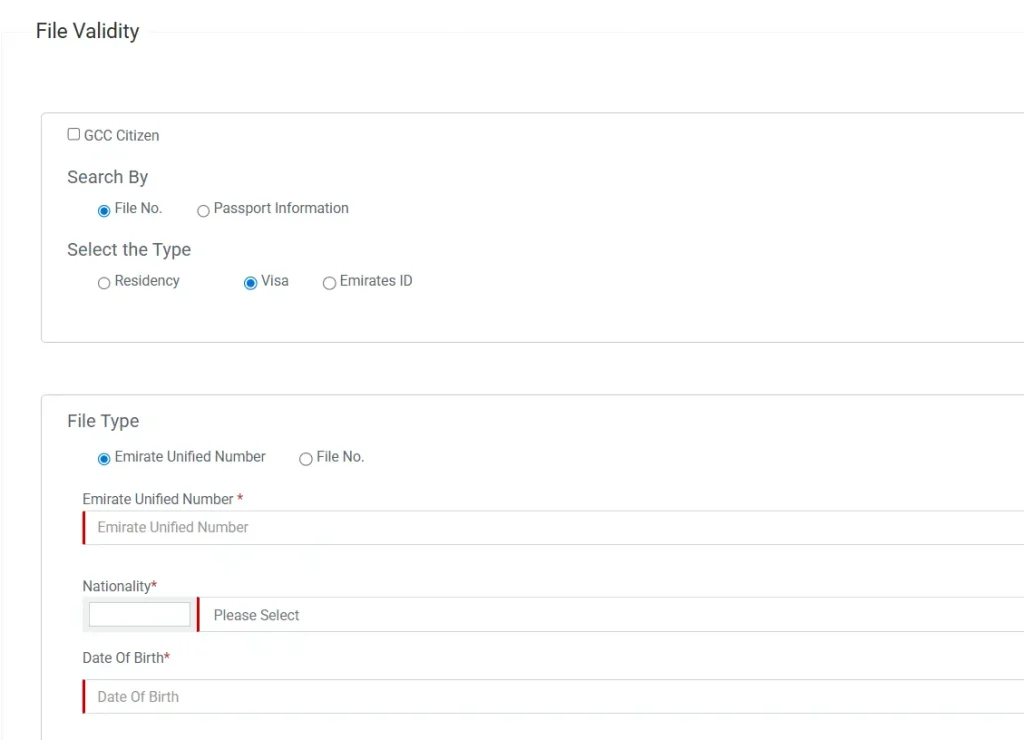
- You will be directed to the page with the file number in the GCC section of the file validity page.
- Select it along with the option of visa, you can also select the residency option instead of visa, if you are a resident.
- A section appears underneath with the Emirate UID option. select it.
- Step 4: Enter your details carefully
- UID: Type it exactly as written. No extra spaces, no dashes.
- Date of birth: Pay attention to the format the website wants (usually DD/MM/YYYY).
- Nationality: Pick your nationality.
- Step 5: Clear the captcha and hit "search"
Within seconds, your status appears. You’ll see:
- Whether your visa is active, expired, or used.
- Your visa expiry date.
- Your file number (write this down; it’s useful for future checks).
Method 4: Check by File Number (For Renewals and Applications)
If you’re in the middle of a visa process, maybe a renewal or a new application, you probably have a file number.
What a File Number Is
Your file number is tied specifically to your current visa. Every time you renew or get a new visa, you get a new file number. It’s how the system tracks your current status.
Where to Find It
- On your visa application receipt
- In emails from your sponsor or PRO
- On any official correspondence about your visa
Step-by-Step: What to Actually Do
- Step 1: Open the right website
- Go to ICP Smart Services.
- Step 2: Go to the right options
- On the ICP Smart Services site, go to the Public service option in the top-left corner after the Home option.
- Step 3: Further Navigation
- After clicking the Public Service option, you will come to the page with the file validity option in the top-left corner after the Establishment Inquiry option.
- Click it.
You will be directed to the page with the file number in the GCC section of the file validity page.
- Select it along with the option of visa, you can also select the residency option instead of visa, if you are a resident.
- A section appears underneath with the file number option again. Select it.
- Step 4: Enter your details carefully
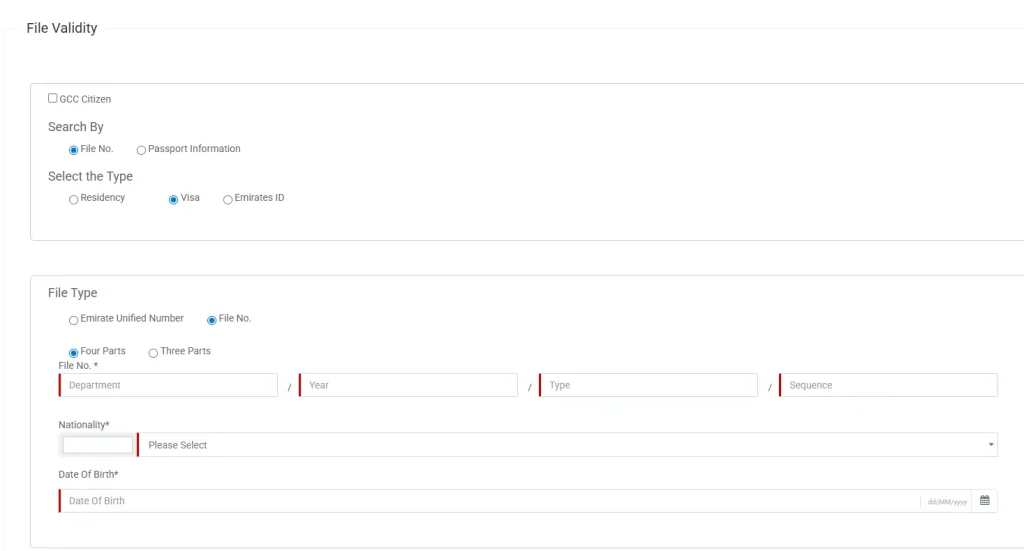
- File Number: Type it exactly as written. No extra spaces, no dashes.
- Date of issuance: Pay attention to the format the website wants (usually DD/MM/YYYY).
Check your file number format:
- If it’s in four parts (like 123/2024/456/789), select “Four Parts.”
- If it’s in three parts, select “Three Parts.”
Nationality: Pick your nationality.
- Type
- Date of Birth
- Step 5: Clear the captcha and hit "search"
Within seconds, your status appears. You’ll see:
- Whether your visa is Active, Expired, or Used.
- Your visa expiry date.
Checking a US Visa from the UAE
Planning a trip to America? You can check your US visa status from here, too. It’s a separate system, but just as straightforward.
What You'll Need
- Your DS-160 confirmation number
- Your passport number
How to Do It
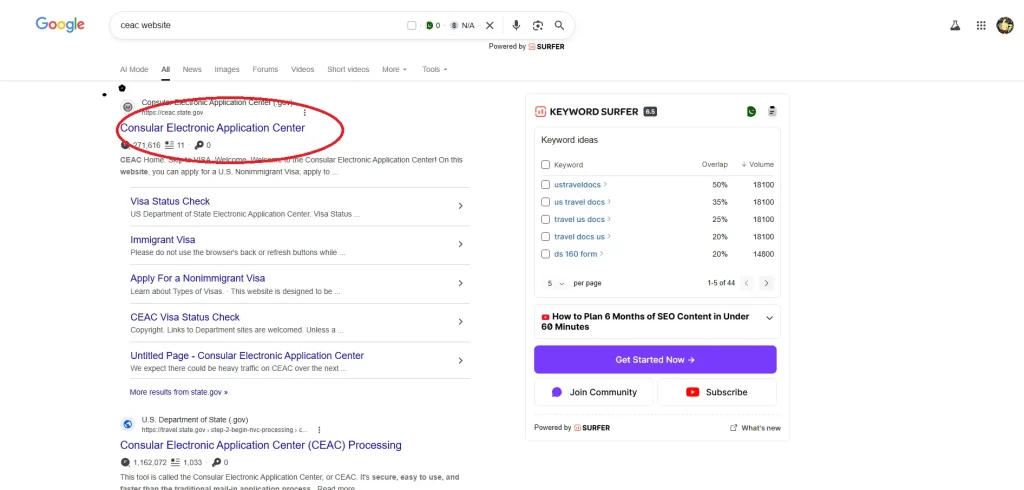
- Step 1: Visit the CEAC website
- The Consular Electronic Application Center is the official US visa portal. It’s run by the US State Department.
- Step 2: Select "Check My Visa Application Status"
- It’s usually right on the homepage. You can’t miss it.
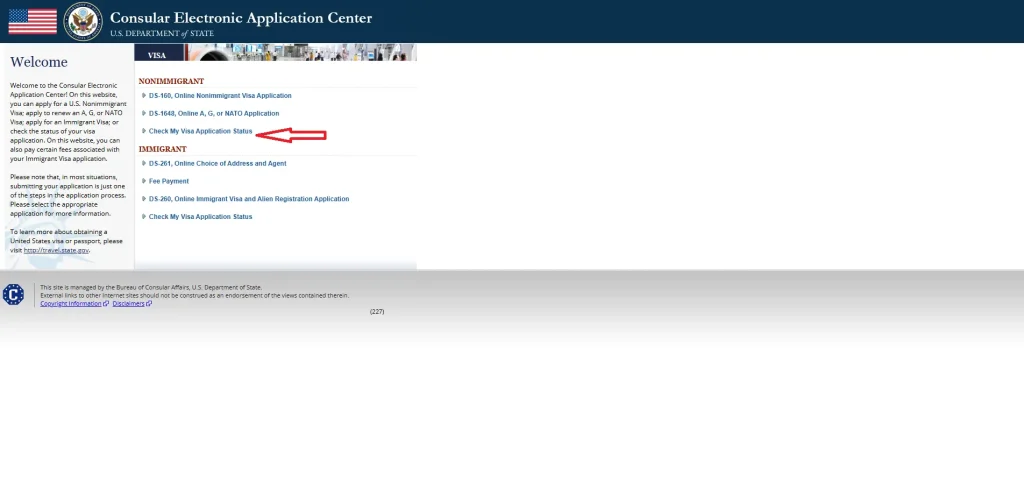
- Step 3: Select the correct option (immigrants or non-immigrants) from the dropdown of Visa Application Type.
- Step 4: Choose your correct options
- Pick the embassy where you applied, either Dubai or Abu Dhabi.
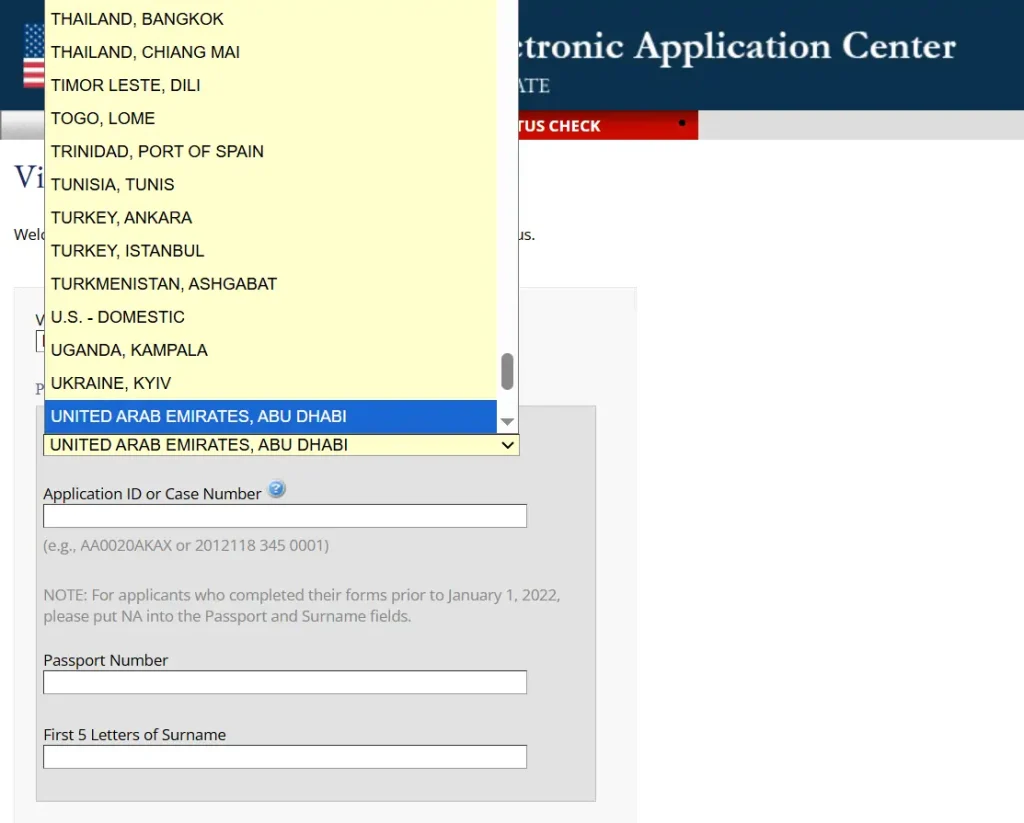
- Step 5: Enter your information
- Your DS-160 confirmation number (It is what you get after submitting the US visa application online. It’s on the confirmation page. Mix of letters and numbers).
- Your passport number
- The captcha code (to prove you’re human)
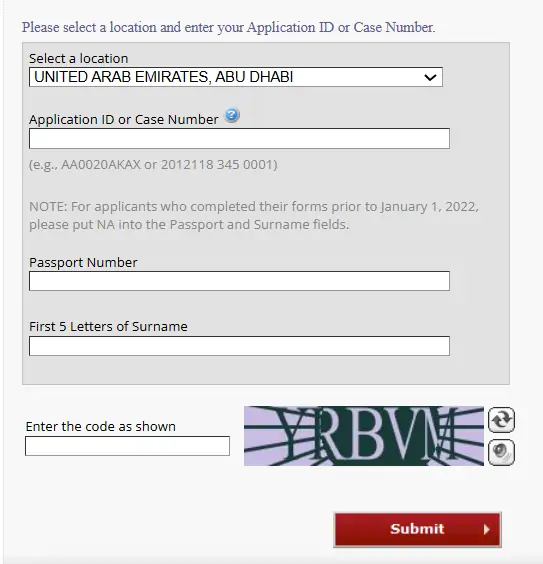
- Step 6: Enter your information
Status | What it means |
Administrative Processing | Still under review. Can take 2-3 weeks. |
Issued | Your visa is ready for pickup or delivery. |
Refused | Application denied. They’ll explain why. |
Ready for the interview | Schedule your appointment if you haven’t yet. |
A word of patience: US visa processing takes time. Checking once a week is plenty; daily checks will just stress you out. The system updates when there’s actual news, not before.
Quick Comparison: All Methods at a Glance
Method | What you need | Best for | Time |
Passport number | Passport + expiry + nationality | Tourists, quick checks | 30 seconds |
Emirates ID | ID number (back of card) | Residents, families | 20 seconds |
UID number | 9-digit unified number | Complete history | 30 seconds |
File number | Current visa file number | Renewals | 30 seconds |
US visa | DS-160 number | US-bound travelers | Varies |
What Is the UAEICP App (ICP App)
The UAEICP app is the official app from the Federal Authority for Identity, Citizenship, Customs, and Port Security. Think of it as your all-in-one digital office for immigration matters in the UAE.
Who it’s for: Citizens, residents, and visitors.

What It Provides
Service | What You Can Do |
Visa Status | Check your current visa status in seconds using your passport, Emirates ID, UID, or file number |
Residency | Apply for new residencies and employment visas for yourself or family members. Keep in mind that while processing a residency visa, completing the UAE medical fitness test requirements is another essential step before visa approval. |
Fines | View and pay any visa or residency fines instantly |
Passport Services | UAE citizens can renew passports or print family books |
Reports | Generate travel status reports or view people under your sponsorship |
Visit Visas | Apply for visit visas for relatives or extend on-arrival visas |
Digital ID | Access a digital version of your Emirates ID or generate a QR code for verification |
The best part: Everything happens on your phone. No waiting in lines. No paperwork. Just tap, fill, and submit.
If you have dependents, sponsoring your family means keeping track of multiple visas. Our family sponsorship guide helps you manage renewals and avoid fines.
Checking for Family Members
Sponsoring a spouse or children? You can check all their statuses in one place. Same app, just look for the “Family Members” tab. Select the person you want, and their information appears instantly.
This is a huge time-saver for parents. No more juggling multiple passports and file numbers. Everything is linked to your ID, and you can see the whole family’s status in under a minute.
What If You're Outside the UAE?
The UAEICP app works globally. Whether you’re on holiday in the Maldives or a business trip in Tokyo, you can check your residency status from anywhere.
Perfect for keeping tabs on things while you’re away. The app connects directly to the UAE’s systems, no matter where you are in the world.
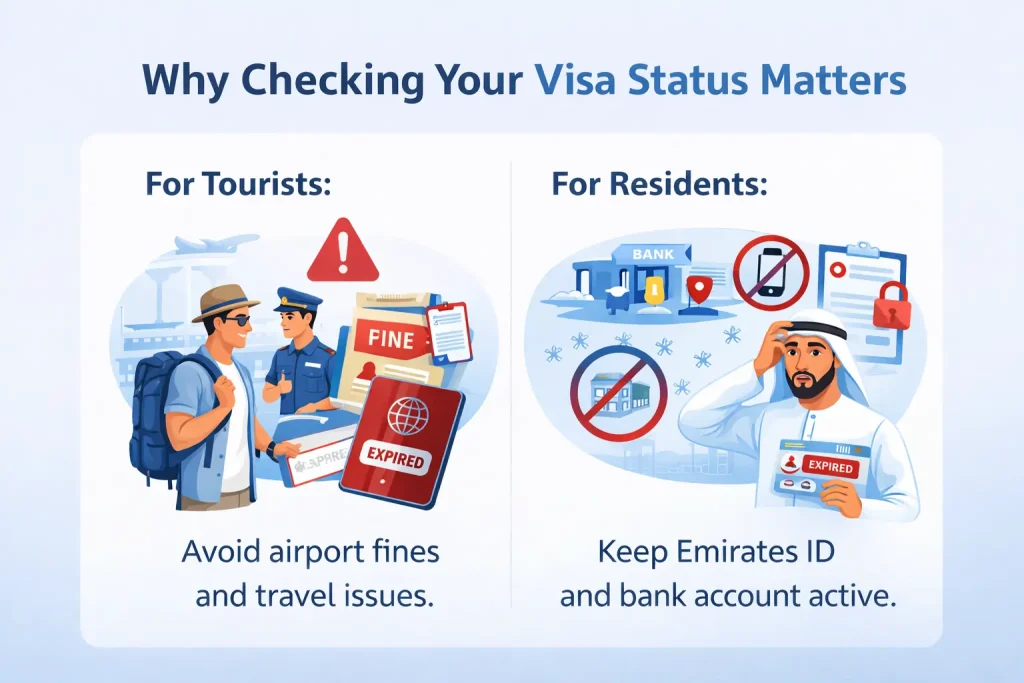
Why Checking Your Visa Status Matters
Here’s something people don’t always realize until it’s too late: your visa status affects everything.
For tourists, an expired visa means fines at the airport that can ruin the end of what was otherwise a wonderful trip.
For residents, an expired visa means your Emirates ID stops working, your bank account might get frozen, and suddenly, simple things like renewing your phone plan or signing a new rental contract become impossible.
The good news? Checking takes about 60 seconds. And once you know your status is clear, you can stop worrying and actually enjoy your time here.
The UAE processed over 62 million transactions through GDRFA alone in 2022. That’s millions of people successfully navigating this system. You will too.
When Nothing Works: The Complete Troubleshooting Guide
Sometimes the system just doesn’t cooperate. Here’s what to do, step by step.
Check for Typos
This sounds too simple, but it’s the answer more than half the time. Check every digit. The number “0” and the letter “O” are the usual suspects. Also, check that you haven’t added spaces where they don’t belong.
Poor Documentation
The problem: Blurry scans. Expired passport. Missing pages. Incomplete forms.
The fix: Submit clean, high-resolution scans. Make sure your passport is valid for at least six months from your travel date.
Include everything on the checklist: insurance, employment letters, and sponsorship papers.
Verify You're on the Right Portal
Try Different Information
- If you renewed your passport, try your old number
- If you have a UID, try searching by that instead
- If you have a file number, try that
- If you have an entry permit, try that
Wait 24-48 Hours
New visas don’t appear instantly. Give the system time to update across all the different government databases. Patience here saves frustration.
Check with Your Sponsor
If you’re still stuck, contact the person or company that sponsored your visa. They might have additional information or be able to check from their end.
Financial Proof Problems
The problem: Your bank statement is three months old. Or it shows barely any money. Or it’s not an official statement.
The fix: Provide recent, official bank statements showing enough funds to cover your stay. If you’re being sponsored, make sure their documents are equally solid.
Active or Previous Visa Issues
The problem: You still have an active visa from before. Or you overstayed last time. Or a previous application was rejected.
The fix: Cancel any old visas before applying again. If you’ve overstayed or been rejected before, resolve those issues first. The system remembers.
Handwritten Passports
The problem: Your passport is handwritten. UAE immigration doesn’t accept these anymore.
The fix: Get a new machine-readable passport before applying.
Visit a Center in Person
If nothing works and you’re sure your visa exists, visit the following:
- GDRFA Al Jaffliya for Dubai visas.
- ICP Customer Happiness Center for other emirates.
Bring all your documents. Passports, old visas, application receipts, everything. Officers there can manually sync your file and fix whatever’s wrong.
The centers are designed to handle exactly these situations.
For work permits and labor contracts
A Few Things to Keep in Mind
Only use official government sites. Third-party websites might look helpful, but they often charge fees or mishandle your information. Stick to the real ones.
Have your information ready before you start. Passport number. Emirates ID. Application reference. Whatever you have. It’s easier when you’re not searching through emails mid-way.
Know the split. Dubai runs its own system. The other six emirates share the federal system. Pick the right one the first time and save yourself the headache.
Disadvantages and Risks of UAE Visa Checks and Applications
Nobody talks about this part much. But if you’re applying for a UAE visa or checking your status, there are some things that can go wrong. Not to scare you, just so you know what to watch out for.
Common Problems People Run Into
Visa rejections happen more than you'd think
Even small mistakes can get your application denied. A typo in your name. A passport scan that’s slightly blurry. A signature that doesn’t match the one they have on file. The system checks everything.
Technical errors are frustratingly common.
Your name gets spelled wrong in the system. Your passport number has one digit off. Your profession code doesn’t match what you actually do. These tiny mistakes can delay your visa for weeks.
Documents get rejected for small reasons.
Blurry photos are the biggest one. Missing hotel bookings. Flight confirmations that don’t match your passport name. Bank statements that don’t show enough funds. It’s not always fair, but it happens.
Your past comes back to haunt you.
If you overstayed a visa before. If you had a visa rejected years ago. If there’s an old violation you forgot about. The system remembers. And it can block new applications.
Rules change without
warning.
What worked last month might not work today. Visa requirements shift. Processing times change. Fees go up. You have to stay on top of it, or you’ll be caught off guard.
What Happens When Things Go Wrong
You lose money
Application fees aren’t refundable. If your visa gets rejected, that money is gone.
You could get banned
Serious violations or repeated mistakes can lead to entry bans. Months.
Fines add up fast
Overstay your visa by one day? AED 50. Another day? Another AED 50.
How to Protect Yourself
Check everything twice
Your name. Your passport number. Your photo. One extra minute of checking saves weeks of frustration.
Clear your record first
If you’ve had visa issues before, resolve them before applying for something new to save you from any problem.
Pick the right visa
Tourist. Visit. Employment. Golden. They’re not interchangeable. Choose wrong, and you’re starting over.
Use official channels only
Third-party websites might be cheaper or faster. They’re also how people get scammed.
Stay updated
Visa rules change. Follow official sources. Know what’s required before you apply. It saves a lot of time.
Frequently Asked Questions
These are the questions that come up every single day. Hopefully yours is here.
This is frustrating, but it's almost always one of three things:
- Typo: Check for spaces. Make sure "0" isn't confused with "O."
- Wrong portal: A Dubai visa won't show on ICP. An Abu Dhabi visa won't show on GDRFA.
- System delay: New visas can take 24-48 hours to appear. Wait and try again.
Both portals work globally. No VPN needed. No special access required. Just the internet and your passport.
- UID (Unified Number): Your lifetime ID in the UAE. 9 digits, never changes. Think of it as your immigration fingerprint.
- File Number: Tied to your current visa. Changes every time you renew or get a new job.
Dubai Airport Terminal 3 has a GDRFA center open 24/7. Arrivals hall, near Entrance 1. They handle emergencies exactly like this. Phone: +971 4 313 9999.
Most applications are processed within 48 hours thanks to the Salama AI system. If it's been 5+ days and still says "Pending," check your email (including spam) for requests from ICP or GDRFA.
Yes. If you're the sponsor, log into the UAEICP app and look for "Family Members." You'll see everyone's status in one place.
Yes. Absolutely. It's the most common method. Use GDRFA for Dubai visas, ICP for everywhere else. Enter your passport number, expiry date, and nationality. Your status appears instantly. No file number needed.
One Last Thing
Nobody wakes up excited to deal with visa paperwork. It’s just one of those things that comes with living in or visiting a place as dynamic as the UAE. But here’s the truth that thousands of people discover every year: Once you’ve checked and everything’s good, that weight lifts. No more wondering. No more “what ifs,” just the peace of mind that lets you focus on what actually matters: your family, your work, your next adventure.
The UAE processes more visas than almost any country in the world. The system is built to handle this volume, and it works beautifully when you know how to use it.
Now you know.So take the five minutes. Check your status. Then get back to your life.
You’ve got this.